What is a columnstore index?
A columnstore index is a technology for storing, retrieving and managing data by using a columnar data format, called a columnstore.
columnstore
A columnstore is data that is logically organized as a table with rows and columns, and physically stored in a column-wise data format.
A columnstore is data that is logically organized as a table with rows and columns, and physically stored in a column-wise data format.
rowstore
A rowstore is data that is logically organized as a table with rows and columns, and then physically stored in a row-wise data format. This has been the traditional way to store relational table data. In SQL Server, rowstore refers to table where the underlying data storage format is a heap, a clustered index, or a memory-optimized table.
A rowstore is data that is logically organized as a table with rows and columns, and then physically stored in a row-wise data format. This has been the traditional way to store relational table data. In SQL Server, rowstore refers to table where the underlying data storage format is a heap, a clustered index, or a memory-optimized table.
rowgroup
A row group is a group of rows that are compressed into columnstore format at the same time. A rowgroup usually contains the maximum number of rows per rowgroup which is 1,048,576 rows.
A row group is a group of rows that are compressed into columnstore format at the same time. A rowgroup usually contains the maximum number of rows per rowgroup which is 1,048,576 rows.
For high performance and high compression rates, the columnstore index slices the table into groups of rows, called rowgroups, and then compresses each rowgroup in a column-wise manner. The number of rows in the rowgroup must be large enough to improve compression rates, and small enough to benefit from in-memory operations.2
column segment
A column segment is a column of data from within the rowgroup.
A column segment is a column of data from within the rowgroup.
- Each rowgroup contains one column segment for every column in the table.
- Each column segment is compressed together and stored on physical media.
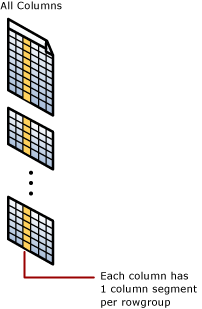 clustered columnstore indexA clustered columnstore index is the physical storage for the entire table.
 To reduce fragmentation of the column segments and improve performance, the columnstore index might store some data temporarily into a clustered index, which is called a deltastore, and a btree list of IDs for deleted rows. The deltastore operations are handled behind the scenes. To return the correct query results, the clustered columnstore index combines query results from both the columnstore and the deltastore.deltastore
Used with clustered column store indexes only, a deltastore is a clustered index that improves columnstore compression and performance by storing rows until the number of rows reaches a threshold and are then moved into the columnstore.During a large bulk load, most of the rows go directly to the columnstore without passing through the deltastore. Some rows at the end of the bulk load might be too few in number to meet the minimum size of a rowgroup which is 102,400 rows. When this happens, the final rows go to the deltastore instead of the columnstore. For small bulk loads with less than 102,400 rows, all of the rows go directly to the deltastore.When the deltastore reaches the maximum number of rows, it becomes closed. A tuple-mover process checks for closed row groups. When it finds the closed rowgroup, it compresses it and stores it into the columnstore.nonclustered columnstore index
A nonclustered columnstore index and a clustered columnstore index function the same. The difference is a nonclustered index is a secondary index created on a rowstore table, whereas a clustered columnstore index is the primary storage for the entire table.The nonclustered index contains a copy of part or all of the rows and columns in the underlying table. The index is defined as one or more columns of the table, and has an optional condition that filters the rows.A nonclustered columnstore index enables real-time operational analytics in which the OLTP workload uses the underlying clustered index, while analytics run concurrently on the columnstore index (REF : https://docs.microsoft.com/en-us/sql/relational-databases/indexes/columnstore-indexes-overview )

No comments:
Post a Comment