
SQL Server 2016 New Feature

SQL Server 2016 New Feature :- JSON

INTRODUCTION

JSON stands for Java Script Object Notation, just like XML, JSON is the syntax for storing and exchanging data. It is more lightweight than XML.

EXAMPLE

[{ "name": "Bob", "skills": ["SQL", "C#", "Azure"] }, { "name": "Lata", "surname": "Mangeshkar" }]


SQL Server provides built-in functions and operators that let you do the following things with JSON text.
  • Parse JSON text and read or modify values.
  • Transform arrays of JSON objects into table format.
  • Run any Transact-SQL query on the converted JSON objects.
  • Format the results of Transact-SQL queries in JSON format.
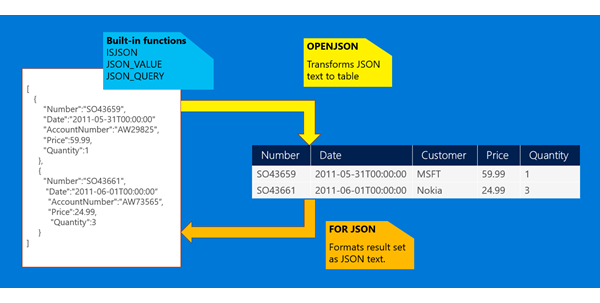
    Overview of built-in JSON support
Function used in SQL server for JSON manipulation/retrieval
  • Use the JSON_VALUE function to extract a scalar value from a JSON string.
  • Use JSON_QUERY to extract an object or an array from a JSON string.
  • Use the ISJSON function to test whether a string contains valid JSON.
  • Use the JSON_MODIFY function to change a value in a JSON string.

SCENARIO
We have department and employee table connected with foreigh key DeptID, We need JSON output as a whole and JSON by department.

SOLUTION
First we create tables and insert data as shown below.

CREATE TABLE DEPARTMENT
(
DEPTID INT IDENTITY(1,1) PRIMARY KEY,
DEPTNAME NVARCHAR(255)
)

INSERT INTO DEPARTMENT VALUES ('DEPT1'),('DEPT2'),('DEPT3')

CREATE TABLE EMPLOYEE
(
EMPID INT IDENTITY(1,1) PRIMARY KEY,
DEPTID INT REFERENCES DEPARTMENT(DEPTID),
EMPNAME NVARCHAR(255),
DOB DATE,
DOJ DATE
)

INSERT INTO EMPLOYEE VALUES (1,'Emp1','1984-01-01','2001-01-01'),(1,'Emp1','1984-01-01','2001-01-01'),(1,'Emp2','1984-05-01','2001-01-15'),(2,'Emp3','1982-01-01','2000-01-01'),(3,'Emp4','1984-12-01','2001-12-01')

For retrieving complete JSON
SELECT 
DEP.DEPTNAME,EMP.EMPID,EMP.EMPNAME,EMP.DOB,EMP.DOJ
FROM DEPARTMENT AS DEP
INNER JOIN EMPLOYEE AS EMP
ON DEP.DEPTID = EMP.DEPTID
FOR JSON PATH 

For retrieving JSON by each Department
SELECT  DEPTID, DEPTNAME, (SELECT EMPID,EMPNAME,DOJ,DOB FROM EMPLOYEE WHERE DEPTID = DEP.DEPTID FOR JSON PATH) AS EmployeeInfo 
FROM DEPARTMENT AS DEP

Comments

Post a Comment

Popular posts from this blog

DataZen Syllabus

INTRODUCTION TO DATAZEN PRODUCT ELEMENTS ARCHITECTURE DATAZEN ENTERPRISE SERVER INTRODUCTION SERVER ARCHITECTURE INSTALLATION SECURITY CONTROL PANEL WEB VIEWER SERVER ADMINISTRATION CREATING AND PUBLISHING DASHBOARDS CONNECTING TO DATASOURCES DESIGNER CONFIGURING NAVIGATOR CONFIGURING VISUALIZATION  PUBLISHING DASHBOARD WORKING WITH MAP  WORKING WITH DRILL THROUGH DASHBOARDS

PowerBI Interview Questions and Answers

Power BI Interview Questions – General Questions 1). What is self-service business intelligence? Ans: Self-Service Business Intelligence (SSBI) is an approach to data analytics that enables business users to filter, segment, and, analyse their data, without the in-depth technical knowledge in statistical analysis, business intelligence (BI). SSBI has made it easier for end users to access their data and create various visuals to get better business insights. Anybody who has basic understanding of the data can create reports to build intuitive and shareable dashboards. 2). What are the parts of Microsoft self-service business intelligence solution? Ans: Microsoft has two parts for Self-Service BI  Excel BI Toolkit – It allows users to create interactive report by importing data from different sources and model data according to report requirement.  Power BI – It is the online solution that enables you to share the interactive reports and queries that you have created using ...

MS BI Syllabus

Microsoft Business Intelligence Course Syllabus SSRS – SQL Server Reporting Services  Getting Started 1. Understanding Reporting (Authoring,Management,Delivery) 2. Installing Reporting (Native Mode, SharePoint Integration mode) 3. Building your first report  Authoring Reports 1. Developing Basic Reports (RDL,wizard,designer,datasource,dataset,formatting) 2. Working with expressions (expression to calculate value, Agg functions, exp for objects) 3. Organizing Data (Data Regions, Table, Matrix, Chart, List) 4. Advance Report (Parameter, drill down, drill through, links, 5. Report Model (Data Source, Data Source View, Model , Report Builder 3.0)  Managing Report ( Report Manager) 1. Managing Content (deploying report, folders, linked reports, datasources, value etc) 2. Managing Security (Item Level , Site navigation, localhost – sql) 3. Managing Server Config (Config Manager, Report Manager, Report Server DB)  Delivering Report 1. Accessing Report (Viewing...